Associated Student Body (ASB) and Clubs
Approved Clubs at JAMS (updated 12/4/25)
| Club Name | Advisor | Room Number | Day of Club | First Meeting Date |
|---|---|---|---|---|
| Anime Club | Ms. Alden | 120 | Monday | 11/17/2025 |
| Crochet Club | Ms. Hensiek | 228 | Thursday | 11/20/2025 |
| D&D Club | Mr. G | 214 | Monday | 11/17/2025 |
| Science Fair Club | Ms. Van More | 118 | Monday | 9/15/2025 |
| Black Student Union Club | Ms. Ty | 207 | Monday | 12/8/2025 |
| Video Game Club | Mr. G | 224 | Tuesday | 12/16/2025 |
| Latino Student Union Club (LSU) | Ms. Yadira Mr. Mitchell Ms. Emily C | 111 | Monday | 2/23/26 |
| GSA Club | Thursdays | 1/8/2026 | ||
| JAMS Running Club | Ms. Park | 221 | Tuesday | 2/24/2026 |
| Tutoring Club 2026 | Ms. Okubo Mr. VanderYacht | 109 | Thursday | 3/12/2026 |
Clubs at JAMS
The JAMS Club application is officially open: JAMS 2025-2026 New and Returning Club Application.
New and Returning Club
Thank you for your interest in starting a club! Please fill out the club application, which will go through a review and approval process by our Leadership class. Any student is welcome to start a club as long as they have a staff member to supervise the meeting sessions. Clubs will meet only on Monday, Tuesday, or Thursday from 4–5:30 p.m. You will receive an email confirmation from the ASB Leadership class upon approval of your club. Once approved, you can start meeting with your club. If you have any questions, please contact jams@seattleschools.org
Join a Club
Parents/Guardians
- Go to the SPS FinalForms website
- Select “Click Here for a Confirmation Email”
- Check your email for a confirmation link, and click confirm your account in the email text.
- You will receive an email within 2 minutes prompting you to confirm and complete your registration. Remember to check your spam folder.
- Reminder: FinalForms will use the same parent/guardian email on file in PowerSchool
- Create your new FinalForms password and click confirm account.
Students
- Students will use their district (SPS) email account to log into FinalForms
- Reminder: Students new to the district should contact their school for log-in support
If you require any support during the process, review the FinalForms Parent Playbook or visit the FinalForms Support page.
Signing Up on FinalForms:
Parents/Guardians will need to create an account first through the Parent Portal.
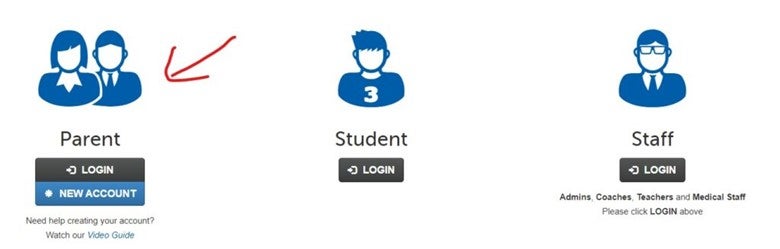
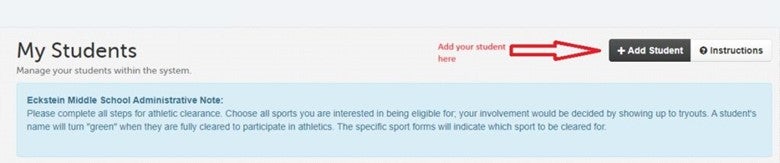
Once you are in, you will need to add your student.
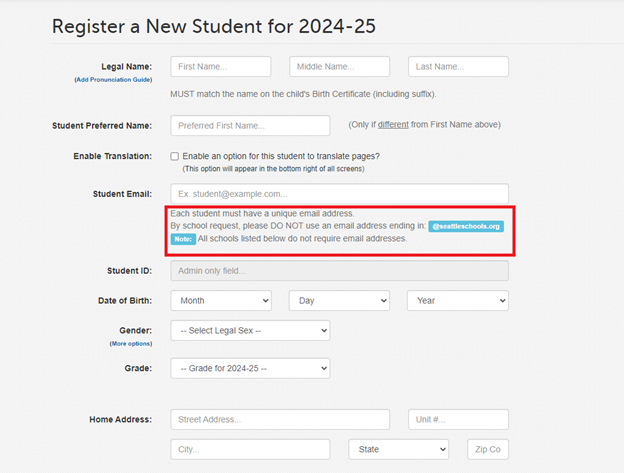
You will need to register your student with a non-SPS email for your student. This can be another adult email, your student’s non-SPS email, or create an email specifically for FinalForms.
Accessing the Appropriate Forms
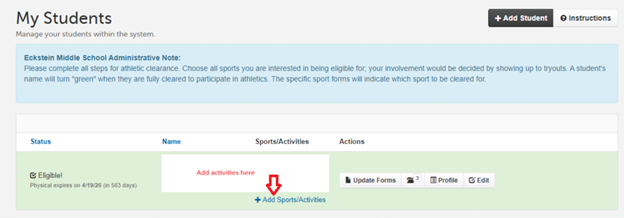
You will add forms by clicking on the Add Sport/Activity Link.
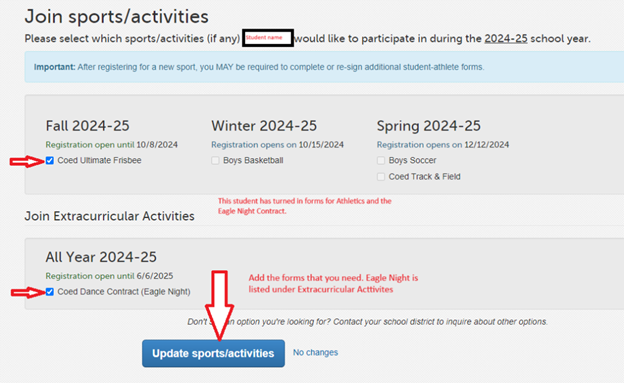
This will pull up a page where you can find the Sport/Activity you need. Clubs are under Extracurricular Activities. Click on Update sports/activities.
Completing the Forms
For all forms, Athletic & Extracurricular Activities that need to be completed by a parent/guardian, must be completed by the adult first. Then the student will get an email prompting them to complete their portion of the form.
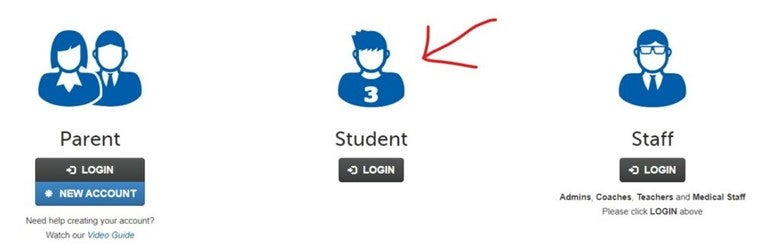
The student will then follow the link in the email to create their own account in FinalForms that they access through the Student Portal.
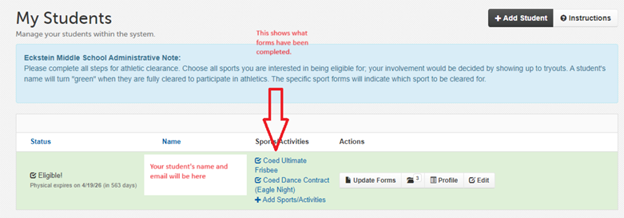
When your student has completed their forms first page will look like this:
If you require any support during the process, scroll to the bottom of the FinalForms page and click Get Help or use the following link: Final Forms Support
Student IDs
All students were given a JAMS picture ID card on picture day.
Replacements for lost, stolen, or damaged Jane Addams Middle School Student ID Cards carry a replacement fee of $10. To get a new card, please make the payment through SchoolPay and then visit the main office to receive the replacement.
If you have any questions, feel free to contact us at jams@seattleschools.org.
Associated Student Body (ASB) Funds
Publication of Information
Required per RCW 28A.325.050
An Associated Student Body (ASB) is a formal organization of students, including sub-component or affiliated student groups, formed at each public school within Seattle Schools. The programs of the ASB are any optional, noncredit, extra-curricular activity conducted in whole or in part by or on behalf of an ASB, during or outside regular school hours, within or outside school grounds and facilities and conducted with the approval of the school district or under the official designee to whom authority has been delegated to act on behalf of an ASB or sub-component group. ASB programs and activities must be of a cultural, athletic, recreational or social nature benefitting the ASB.
Money generated or collected, including fundraising proceeds, in conjunction with ASB activities, is public money which must be deposited into the ASB Fund. ASB public money may only be used for optional, noncredit, extra-curricular events and activities of a cultural, athletic, recreational, or social nature.
Posting of the following reports ensures compliance with RCW 28A.325.050 (and ESHB1109). This information is not representative of a school’s full fiscal and/or athletic activity.
Questions regarding the posting of the ASB reports may be directed to:
Chris Johnson
ASB, Trust Analyst
cdjohnson3@seattleschools.org
Fund Balance Reports:
- Fiscal Year 2024-25 ASB School Report
- Fiscal Year 2023-24 ASB School Report
- Fiscal Year 2022-23 ASB School Report
- Fiscal Year 2021-22 ASB School Report
- Fiscal Year 2020-21 ASB School Report
- Fiscal Year 2019-20 ASB School Report
- Fiscal Year 2018-19 ASB School Report
- Fiscal Year 2017-18 ASB School Report
ASB Activity Card Data